


Spades Relax Classic Card Game
4.537.00 Reviews
App Specs
- Version
- 2026.22.179
- Updated On
- License
- Free
- Downloads
- 10,000+
- Developer
- GameDuell INC.
- Categories
- Card
- Platform
- Android
Screenshots
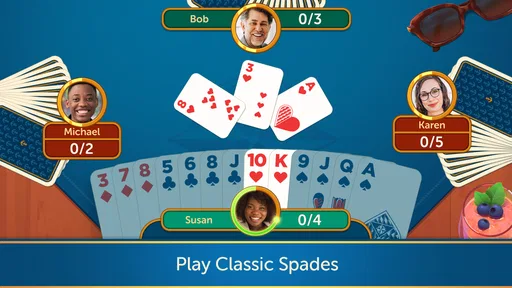


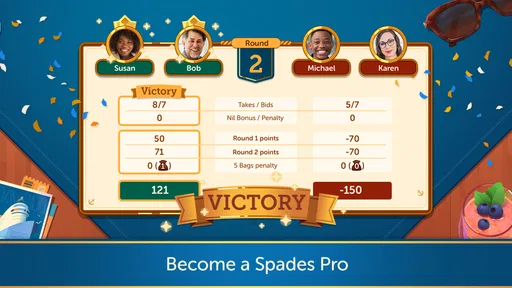
 Analysis by AppCompare
I usually turn to a familiar card game when I have a few quiet minutes and want something more engaging than scrolling. Spades is a good fit for that kind of break: each hand asks me to think ahead, but I don’t need a long setup before I can play. Spades Relax Classic Card Game brings that format to mobile, and its appeal is clearest when I want a relaxed game rather than a demanding, high-speed session.
What I’d expect from a quick session
The name sets a calm tone, and the card-game format suits short visits: I can focus on the current hand, make a decision, and stop when I need to. That doesn’t mean every round is effortless. Spades depends on reading the cards already played and judging what my partner or opponents may be holding, so even a brief session can feel mentally involving. I’d choose it for a coffee break or a quiet wait, not when I need to keep checking notifications every few seconds.
In card games, perceived speed is about more than loading. Clear card movement and responsive controls matter because hesitation can interrupt the rhythm of a trick. The published review below describes play as smooth, but I’d still separate that impression from a promise about every phone or connection. Online play can be affected by conditions beyond the game itself, while a solo session is the more practical choice when I want fewer interruptions from other players.
When a hand gets absorbing
Spades is at its most demanding when a hand’s early decisions shape what I can safely do later. I try to keep track of which suits have been led and which high cards have appeared instead of playing each trick in isolation. That habit makes a casual match feel more rewarding, and it also gives me a reason to choose a slower, focused session over a distracted one.
For an everyday example, I might open the game while waiting for an appointment, play a hand or two, and leave the longer stretch for a time when I can concentrate. If I’m playing online, I’d avoid starting when I know I’ll have to leave abruptly; an interrupted multiplayer game is a less tidy fit for a short gap than a solo round. That small choice helps match the mode to the time I actually have.
Reliability and the practical limits
A card table can look simple, but online play brings extra dependencies: a stable connection, other people being available, and a device that remains responsive while the game is open. I wouldn’t treat one smooth session as proof that every session will behave the same way. If a match pauses or the connection becomes unreliable, the sensible response is to check the network before assuming the game itself is at fault.
I also wouldn’t count on recovering an interrupted online hand unless the game makes that option clear in the moment. Before choosing multiplayer, I’d make sure I have enough uninterrupted time to finish a game. That is a useful habit for any turn-based online card game, and it avoids the frustration of treating a connected match like a disposable single-player round.
Worth Reading Before You Choose

Flipboard Shows What News Apps Must Do Beyond the Feed

Switching to Android Auto Means Rethinking Your Driving Routine

Google Calendar Makes a Crowded Week Easier to Manage

Ludo King Makes the Most of the Minutes Between Plans

Baby Panda World Brings Quick Play to Modern Phones, but Its Game Library Feels Busy

ESPN’s Live Game View Makes Following Close Games Easier
Who will enjoy this kind of Spades
This is a natural option for someone who already likes trick-taking card games, wants a digital table, and appreciates being able to choose between playing alone and meeting other players. The tutorial mentioned in the original review makes it less intimidating for a newcomer, while adjustable difficulty gives experienced players a way to seek more resistance from the AI. I’d recommend learning the basic flow first, then raising the challenge once the rules feel automatic.
It is less suited to someone who wants a quick reflex game, a story-driven campaign, or a purely offline experience with no interest in online opponents. Likewise, anyone who dislikes competitive play may find leaderboards more distracting than motivating. I’d treat those elements as optional context rather than the reason to play: the strongest reason is still the card decisions themselves.
How it fits among card-game alternatives
Compared with a solitaire app, Spades asks me to think about opponents and partnership rather than simply arrange cards into a finished layout. That social and tactical element makes it more involving, but it also means a round can ask for more attention. Compared with a physical deck, the phone is convenient and can connect me with online players, while a real table is better when I want to share the same room and read people face to face.
Some digital card games lean heavily on collection systems or elaborate presentation. The published review presents this one as a straightforward Spades experience, with customization for table and card appearance rather than a complicated premise. I’d pick it when I want the familiar structure of a trick-taking game; I’d choose another title if unlocking lots of content or exploring a changing game world is what I’m after.
First Impressions and Interface
Firing up Spades Relax Classic Card Game for the first time, I was immediately drawn to its simple yet elegant interface. The developers have done a fantastic job of keeping things uncluttered and intuitive. For those who might be new to the game, there's no need to worry. The app offers a neat tutorial that guides you through the basics without overwhelming you.
Navigation is a breeze. The main menu is straightforward, allowing you to dive right into a game or tweak settings to suit your preference. The design is visually appealing with a classic green felt backdrop, giving you the feeling of sitting at a real card table.
Gameplay and Features
Once you're in, the gameplay feels smooth and responsive. The app offers several modes, including solo play against AI opponents and online multiplayer. I spent a good chunk of time testing both. The AI is impressively challenging, with varying levels of difficulty to match your skill. If you're up for a real challenge, the online mode pits you against real players from around the globe.
One feature I particularly appreciated was the chat option in multiplayer mode. It’s a great way to engage with other players and adds a social element to the game. Plus, there’s an in-app leaderboard that keeps track of your progress and ranks you against other players. It’s a small addition, but it adds a competitive edge that keeps you coming back for more.
Customization and Settings
Customization is another area where this app shines. You can tweak almost every aspect of the game, from the card deck design to the table layout. There’s even an option to choose different themes, which is a nice touch if you want to switch things up a bit.
Moreover, the settings menu allows you to adjust sound effects and music. Personally, I love the gentle background music; it’s relaxing but not distracting. However, if you prefer total silence, the app gives you that option too.
Getting more from each hand
My most useful tip is to decide what kind of session I want before tapping into a match. If I have only a few minutes, I choose a solo game and focus on practicing one thing, such as remembering which suits have run out. If I have time to stay engaged, online play makes more sense because the chat and leaderboard add a social, competitive layer. Separating those purposes keeps a quick practice session from turning into an inconvenient commitment.
The customization also has a practical use beyond appearance. I’d choose a deck and table combination that makes the cards easy for me to distinguish at a glance, then leave it alone long enough to build visual familiarity. Changing themes can be enjoyable, but frequent changes may make a fast scan of the hand less automatic. The best setup is not necessarily the most decorative one; it’s the one that lets me spend attention on the trick rather than the interface.
For a new player, I’d use the tutorial as a starting point, then replay against the AI while learning to pause before committing a card. The key question is not just “What can I play?” but “What might this play reveal, and what could I need later?” That simple habit carries over to a real deck, too. Experienced players can use the selectable AI difficulty to keep practice from becoming too comfortable, though playing a computer is not a substitute for adapting to the choices and habits of human opponents.
User Experience and Accessibility
Throughout my time with the app, I appreciated how smoothly everything worked. There's no lag, and the animations are fluid. Whether you're on a high-end device or something more modest, the app seems well-optimized. This inclusivity is something I value highly.
Another point worth mentioning is accessibility. The app’s controls are intuitive, and there’s support for various languages, making it accessible to a broad audience. This is a game that truly invites everyone to the table.
Device fit, cost, and expectations
The game is free to download, with optional in-app purchases listed from $0.99 to $149.99 per item. I’d start without spending: the basic appeal of Spades is in the decisions at the table, so a purchase only makes sense if I understand exactly what it provides and genuinely want it. A broad purchase range is also a reason to check the details carefully rather than treating every item as a small add-on. The game is rated for Everyone, but that doesn’t mean every player will enjoy its competitive side or online social features.
It comes from GameDuell INC., and its current version is 2026.22.179. The game has a 4.5 average from 188 ratings, with 37 written reviews and over 10K installs. Those figures suggest that it has found an audience, but they don’t tell me whether its style will suit my habits. It was released on Jan 17, 2026, and the minimum operating-system requirement is 7.1, so I’d check my device’s software compatibility before downloading rather than assuming an older phone will run it.
For a modest device, a simple card table may seem like a safe bet, but I wouldn’t make a firm claim about battery use, storage demands, or performance from the game’s appearance alone. If my phone is already struggling, I’d close other apps and try a short session before relying on it for a longer match. That is especially sensible when switching between online play, music, and chat: each part can make a session feel busier, even if the game itself remains visually restrained.
Final Thoughts
In a world saturated with flashy, complex mobile games, Spades Relax Classic Card Game is a breath of fresh air. It captures the essence of the traditional card game while adding a sprinkle of modern convenience and connectivity.
If you’re a fan of classic card games, or if you’re just looking for a relaxing way to unwind, I can’t recommend this app enough. It’s the perfect balance of nostalgia and modernity, wrapped up in a user-friendly package. So grab a virtual seat at the table, and let the games begin!
My performance verdict
For me, the main performance advantage is the uncomplicated card-table format: the game is easy to approach, and the original review found its play responsive. I would still be careful about turning that into a guarantee of flawless operation on every device or over every connection. Solo play is the better choice when I want a predictable practice session; multiplayer is worth choosing when I have time for a social match and a dependable connection.
Overall, I’d try it if I wanted Spades on my phone, valued a tutorial and adjustable presentation, and didn’t mind optional purchases being part of a free game. I’d skip it if I wanted a fully self-contained offline pastime, a reflex-based challenge, or a game built around a deep campaign. For the right player, it offers a familiar card-table routine with useful ways to tailor a session; my practical advice is to begin with a short solo game, settle on a clear card design, and move online only when I can give the match my attention.
Pros
- User-friendly interface for smooth gameplay.
- Offers both single and multiplayer modes.
- Customizable game settings enhance experience.
- Regular updates with new features and fixes.
- Low resource usage
- runs smoothly on most devices.
Cons
- Contains ads that can interrupt gameplay.
- Limited avatar customization options.
- Requires internet connection for multiplayer.
- Occasional lag during online play.
- In-app purchases needed for some features.
FAQs for Spades Relax Classic Card Game
What are the main features of Spades Relax Classic Card Game?
Spades Relax Classic Card Game offers an authentic card-playing experience with customizable settings, a variety of difficulty levels, and both solo and multiplayer modes. The app includes smooth animations, intuitive controls, and a user-friendly interface, making it ideal for both beginners and experienced players. Regular updates ensure new features and enhanced gameplay.
Is Spades Relax Classic Card Game free to play?
Yes, Spades Relax Classic Card Game is free to download and play. However, it offers in-app purchases for players who wish to enhance their gaming experience with additional features or remove ads. These optional purchases allow for customization and convenience without affecting the core gameplay.
Does the game require an internet connection?
Spades Relax Classic Card Game can be played offline in solo mode, allowing users to enjoy the game anytime, anywhere. However, if you want to participate in multiplayer mode or access certain online features, an internet connection is required. This flexibility makes it convenient for both on-the-go and at-home play.
What devices are compatible with the game?
Spades Relax Classic Card Game is compatible with both Android and iOS devices. It supports a wide range of smartphones and tablets, ensuring smooth performance across different operating systems. Regular updates help maintain compatibility with the latest device models and software versions.
How can I resolve technical issues with the app?
If you encounter technical issues with Spades Relax Classic Card Game, try restarting the app or your device first. Ensure your app and device software are up to date. For persistent problems, contact customer support through the app's help section or visit the developer's website for troubleshooting resources and assistance.


